BRAP features
GPS tracker for motorcycle rides
Tap “Start” and BRAP begins recording your motorcycle ride as a GPS track. The road you have ridden is drawn on the map as you go. When you tap “Stop,” the route and statistics are saved, and you can share the ride card.
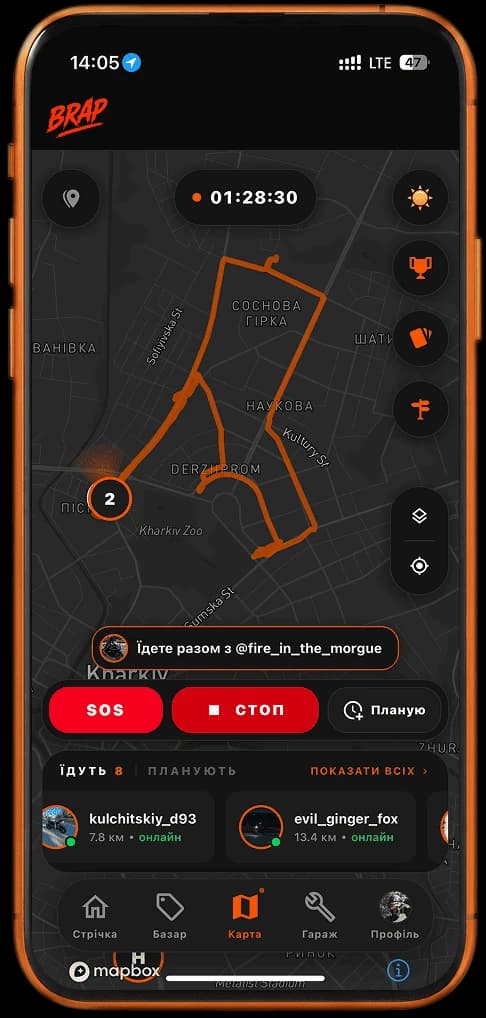
Record your route in real time
The BRAP motorcycle ride tracker is simple: start recording and ride. GPS records the track while a line showing the road you have actually traveled appears on the map. It is not a prediction or a suggestion for where to go next — it is where you have already been.
During an active ride you can see its duration. The route grows with you: every new stretch of road is added to the map until you tap “Stop”.
Not the route ahead — the road behind you
A regular navigation app solves a different problem. It gets you to a destination. BRAP saves the ride itself.
Navigation app
It shows the route you still have to travel. Turns, ETA, and rerouting are about the road ahead.
BRAP
BRAP records and shows the route you have already ridden. The GPS track, ride map, and statistics become your history, not navigation.
Navigation gets you to a place. BRAP saves the ride. If you are gathering people for your next ride, use the ride planner instead of the tracker.
Your whole ride stays with you
After you tap “Stop,” BRAP creates a completed ride card with the route map, distance, time on the road, average speed, and top speed. You can return to the ride later and see exactly where you went.
That is the history of one ride. Season totals, records, and broader analytics live separately in motorcycle ride statistics.
Share the route, not just the numbers
After a ride, you can create an image for Stories or a chat with the track map, statistics, and your own background. You can customize the card before sharing it, so it feels more like a snapshot of the ride than a dry report.
The flow is short: ride the route → finish the ride → customize the card → share it. Sharing uses the system share sheet, so you choose Instagram, a messenger, or saving to your gallery. BRAP does not require a separate social-network integration.
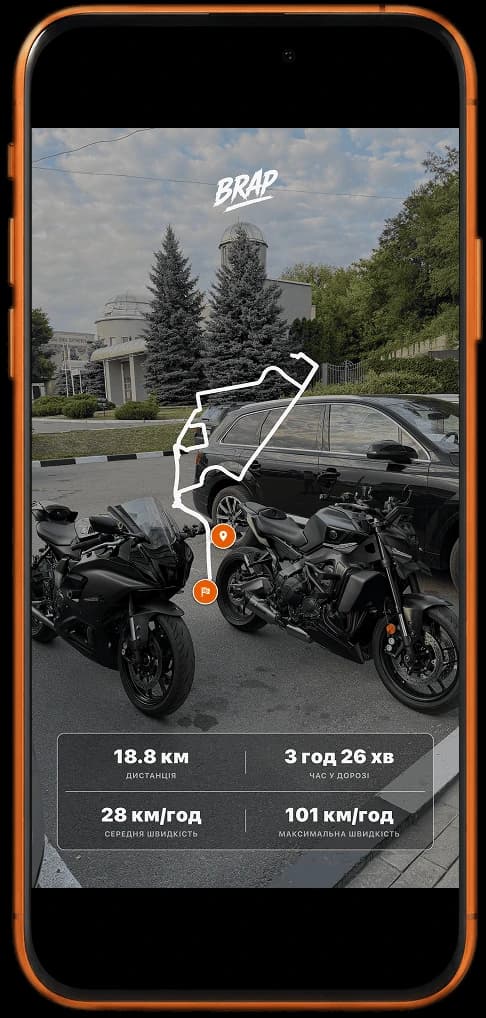
Looking for a “Strava for motorcycles”? Try BRAP
If you searched for a “Strava for motorcycles,” BRAP follows a similar idea for motorcycle rides: it records a GPS track, saves the route and statistics, and lets you share the result. It is not Strava or an official alternative — it is an independent motorcycle app built around riders, group rides, and community.
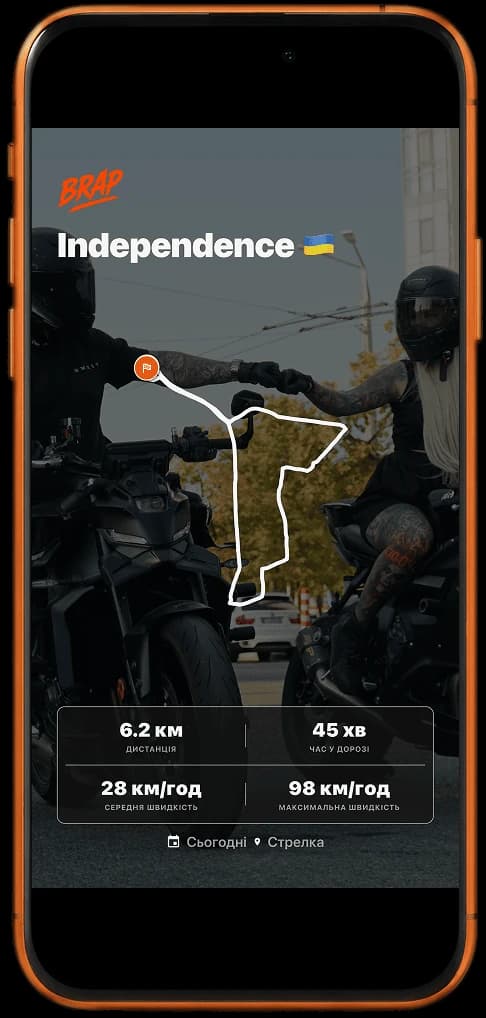
More than a GPS tracker
While recording, you are not riding on an empty map. You can see other riders, and if someone is riding with you, BRAP shows a “Riding with you” section. The tracker records your route while live rider presence remains a separate layer.
See who is nearby now on the live motorcycle map. Gather people around your own ride with group rides. Beyond that is the wider motorcycle community. The tracker itself answers one question: “Where did I ride?”
How to record a motorcycle ride in BRAP
1. Tap “Start”
Start the ride before you head out. BRAP begins recording the GPS track immediately.
2. Ride
The road you have traveled appears as a line on the map in real time. You can also see the ride duration.
3. Finish the ride
Tap “Stop” when you are done. Recording ends and the track stops growing.
4. View the result
The ride card shows the route map, distance, time, average speed, and top speed.
5. Share it
Customize the card and send it to social apps through the system share sheet.
More BRAP features
Frequently asked questions
How do I record a motorcycle ride route?
Tap “Start” before you head out. BRAP begins recording the GPS track, and the road you have traveled is drawn on the map as you ride. Stop the recording when you finish — the route and statistics are saved to your history.
Can I see the route during the ride?
Yes. A line appears on the map in real time. It shows the road you have already traveled, not directions for where to go next. You can also see the duration of the active ride.
How is BRAP different from a regular navigation app?
Navigation apps show the road you still need to travel. BRAP records the road you actually traveled. They solve different problems: BRAP does not provide turn-by-turn directions or replace navigation maps.
What statistics are saved after a ride?
After you stop, BRAP keeps the route map, distance, time on the road, average speed, and top speed. If you added a direction or destination note, it also appears on the ride card.
Can I share my route on social media?
Yes. After the ride, customize the card with the route, statistics, and background, then share the image through the system share sheet. BRAP does not have a dedicated Instagram button — you choose where to publish it.
Is BRAP suitable if I want an activity tracker specifically for motorcycles?
Yes, if you want to record motorcycle rides: GPS tracks, saved routes, statistics, and shareable results. BRAP is an independent motorcycle app with a rider community, not a running or cycling service.
Record a ride in BRAP
GPS track, route history, and a shareable ride card — in the app for iOS and Android.