BRAP features
Motorcycle ride statistics
Every ride you record is added to your BRAP history. See how many kilometers you have ridden, how much time you have spent on the road, how often you ride, which personal records you have set, and where you have been.
To start building the numbers, you first need a track — start recording your rides.
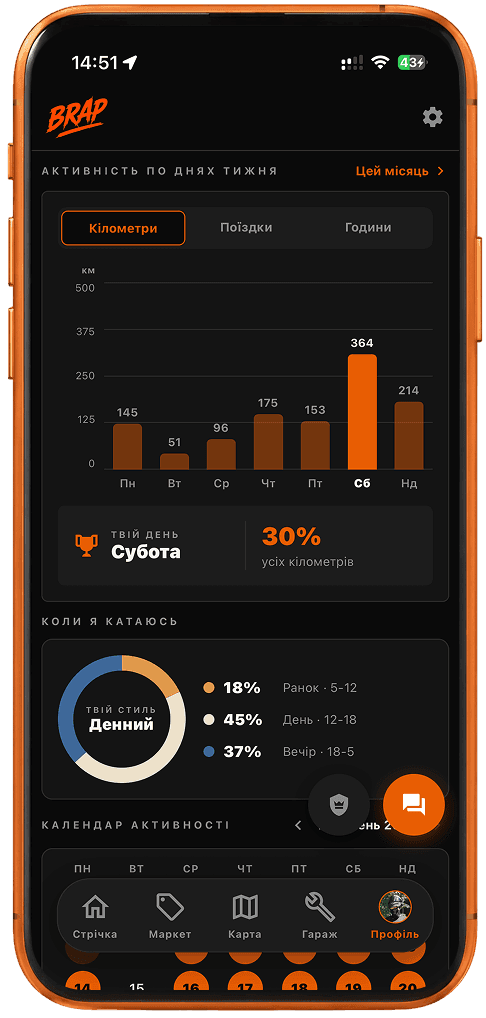
Your whole riding season in numbers
You do not have to remember how much you rode last month. BRAP builds statistics from rides recorded in the app: distance, number of rides, time on the road, average speed, longest ride for the selected period, and days in the saddle.
Switch between this month, this year, and all time. “Distance” means kilometers from tracks recorded in BRAP, not your motorcycle’s odometer. Average speed for the period is weighted by distance, so a long highway ride counts more than a short city ride. “Days in the saddle” is the number of separate dates with at least one recorded ride.
Personal records worth beating
BRAP compares your recorded rides and shows your all-time personal bests, even when you are currently viewing only this month.
Longest ride
The longest distance recorded in a single ride.
Top speed
Your personal GPS-recorded peak, not a ranking against other riders.
Longest day in the saddle
Total riding time within a single day.
Most active month
The month with your highest total distance.
Most rides in a day
The highest number of rides you started in a single day.
Most active week
The week with your highest total distance.
These records are about your own riding history, not competing on public roads.
See when you ride the most
The “When I ride” section groups rides by their start time: morning 5–12, daytime 12–18, and evening/night 18–5. Percentages are based on the number of rides, not distance. A label such as “Your style: daytime” simply means that time of day appears most often — it is not a personality profile.
You may think you are mostly a night rider, while your statistics show that most of your rides actually start during the day.
A calendar that shows every riding day
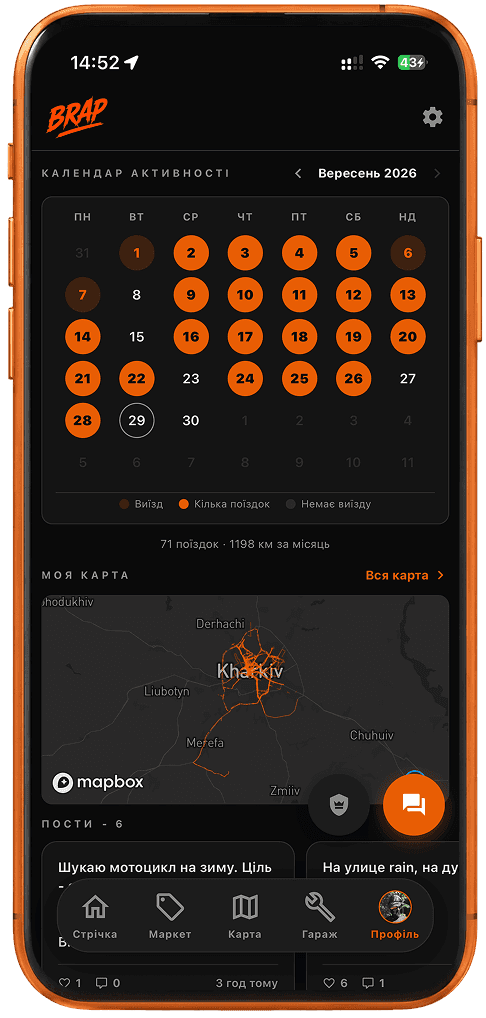
The activity calendar breaks each month down by day: one ride, several rides, or no riding at all. At a glance, you can see whether the bike spent most of the month in the garage or was on the road almost every day.
Below the calendar is the total number of rides and kilometers for the month. You can browse previous months as well.
Your personal ride map
Individual tracks gradually build a personal map of roads you have already ridden. “My Map” overlays your route lines — familiar streets, roads out of town, and the growing geography of your own rides.
Recording one route is the job of the GPS ride tracker. Statistics bring together the history from all completed tracks. The tracker records a ride; statistics show what all those rides add up to over time.
Ride history you can return to
Summary numbers do not replace individual routes. Your ride list keeps the direction or destination, distance, average speed, time, and date. Open any ride to revisit the exact route.
You can share an individual ride card — that belongs to the tracker flow, not summary statistics. Your motorcycle itself, service details, and garage live separately in the motorcycle garage.
From one track to a season of riding
1. Start a ride
Tap “Start” and BRAP records the GPS track.
2. Finish it
After you tap “Stop,” the route and ride metrics are saved.
3. Statistics update
The ride is added to your distance totals, activity calendar, and period summaries.
4. Records update
If the ride sets a new personal best, the corresponding record is updated.
5. Your map grows with you
The track becomes part of your overall ride-history map.
See who is riding nearby right now on the live map. Plan a future ride with the ride planner. This page is only about what you have already recorded.
More BRAP features
Frequently asked questions
What motorcycle ride statistics does BRAP show?
For the selected period, BRAP shows distance from recorded rides, number of rides, time on the road, average speed, longest ride, and days in the saddle. Separately, it shows all-time personal records, the “When I ride” breakdown, activity calendar, route map, and ride list.
How does BRAP calculate mileage?
BRAP counts kilometers from rides you record in the app. It is GPS track data, not the motorcycle’s dashboard odometer and not data read from the ECU.
Can I view statistics for a month?
Yes. Switch between “this month”, “this year”, and “all time”. Personal records are always calculated from your complete history regardless of the selected period.
Is my ride history saved?
Yes. Every completed ride remains in the list with its direction or destination, distance, average speed, time on the road, and date. Open the card to see the specific route.
What is the activity calendar?
The monthly calendar shows days with one ride, days with several rides, and days with no ride. Below it you can see the number of rides and kilometers recorded during the month.
Which personal records does BRAP show?
Longest ride, top speed, longest day in the saddle, most active month and week by distance, and most rides in a single day. These are your own personal bests, not comparisons with other riders.
Can I see all my routes on one map?
Yes. “My Map” overlays the lines from your recorded GPS tracks. Over time, individual routes build a map of the roads you have ridden. BRAP does not currently support GPX export.
Build your ride statistics in BRAP
Record your rides and your season turns into distance totals, an activity calendar, and a map of the roads you have ridden.